How much do text messages cost in Calendesk? Packages, balance and texts abroad
Calendesk sends text messages to your customers and employees: booking confirmations, changes, cancellations and reminders. Every text uses notifications from your balance. This article covers where that balance comes from, how much one text uses and where to check prices. Which notifications go out by text and how to change their wording is covered in How can I edit email, SMS, and push notifications?
Where does your SMS balance come from?
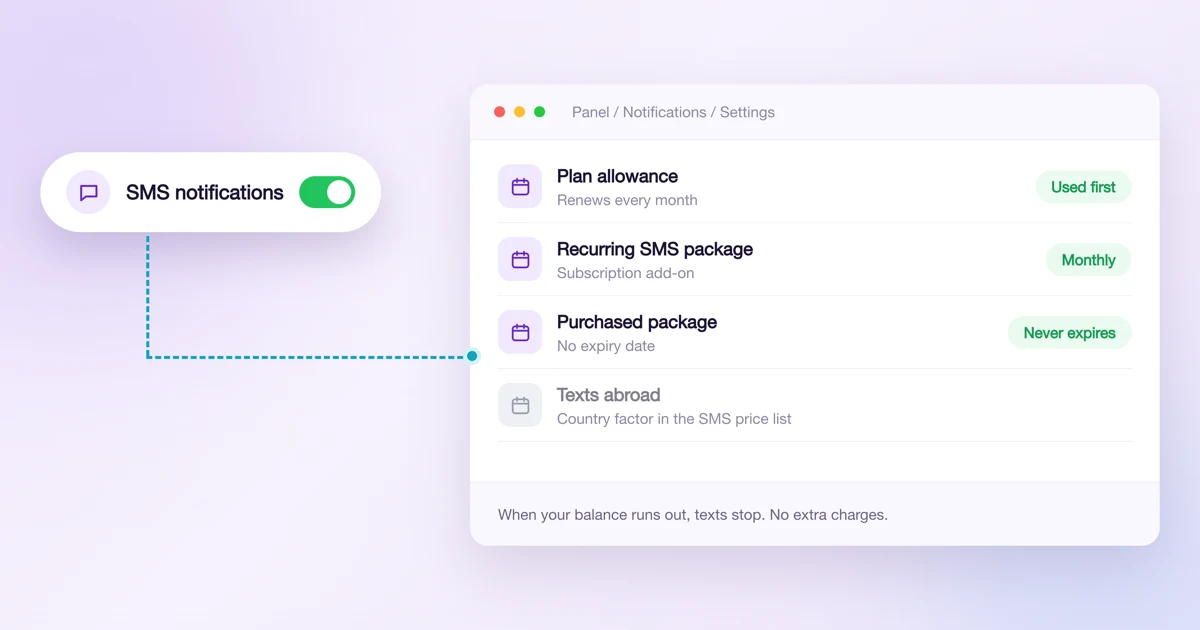
Text messages reach your balance in three ways:
- Your plan's allowance. Every plan includes a set number of texts each month. How many depends on the plan.
- A recurring SMS package. An add-on to your subscription that tops up your balance every month. On the Standard plan it's called the Contact Pro Package, on the Pro plan the Expert Contact Package. Turn it on in Billing → Subscription with the Enable button.
- A purchased package. A one-off purchase that never expires. Go to Notifications → Settings, click Purchase on the SMS notifications card and pick a package. You need billing details and a payment method in the Billing tab to buy one.
Calendesk uses your monthly allowance first. Purchased texts are only used once that allowance is gone.
Plan and SMS package prices are on the Calendesk pricing page. The price of one text in a purchased package depends on your plan.
What happens when you run out?
Text messages stop going out. There are no charges for messages beyond your balance, so you never pay more than you bought. Sending resumes when you buy a package or your next monthly allowance arrives. Emails have a separate balance.
The number of texts you have left is at the top of the SMS notifications card in Notifications → Settings. Check it more often when you have a busy schedule.
How many notifications does one text use?
Two things decide it: how long the message is and where the recipient's number is from.
Message length
One part of a text holds 160 characters. If the message has even one character outside the basic SMS alphabet, such as an accented letter or an emoji, the limit drops to 70. A longer message is split into parts of 153 characters, or 67 with special characters. Each part counts separately.
In Settings → Platform you can turn on Remove special characters in SMS notifications. Calendesk then replaces accented letters with plain ones, so é becomes e, and the same message fits into fewer parts.
Recipient's country
One part of a text to a Polish number uses one notification. To a number in another country, one part can use several notifications, because carriers charge different rates in different countries. The country's factor tells you how many.
For example, if a country's factor is 3 and the message has two parts, that text uses 6 notifications.
Calendesk reads the country from the recipient's phone number, so save numbers with their country code. You set the default country code in Settings → Platform, described in How can I configure platform settings including timezone, language, currency, and phone prefix? A mistyped number that shows no country uses more notifications than a Polish one.
Where are the factors for every country?
In the SMS notifications pricing (PDF). Each country shows how many notifications one part of a message uses.
Can texts show my business name as the sender?
Yes. Instead of the default sender you can set your own name, up to 11 letters and digits. It's a paid add-on. How to turn it on and where to enter the name is covered in How to personalize the sender name for SMS messages?
Frequently asked questions (FAQ)
Do I pay for texts sent beyond my balance?
No. When your balance runs out, texts stop going out. Nothing is charged afterwards.
Do purchased texts expire?
No. Purchased packages never expire. Calendesk uses them once your monthly allowance is gone.
Why did one text use several notifications?
The message was longer than one part, or it went to a foreign number. Long messages, accented letters and emoji split a text into more parts. Abroad, each part uses as many notifications as the country's factor in the SMS notifications pricing (PDF).
Do texts I send to customers by hand use my balance too?
Yes. A text sent from your customer list uses notifications just like an automatic reminder. How to send one is covered in How can I send notifications to customers via email, SMS, and push?
Where can I see how many texts I have left?
In Notifications → Settings, at the top of the SMS notifications card.